
Series: Part 1: Introduction & Motivation | Part 2: Understanding MCP | Part 3: The Agent Loop | Part 4: Inside the Codebase | Part 5: Operations & Extending | Part 6: Running It Yourself | Part 7: Observability | Building a Local AI Agent in Go -- Bonus: Agent Setup & Usage Guide | GitHub
A standalone reference for the Go agent (go-agent/): building it, pointing it at any supported LLM endpoint, turning on observability, running useful queries, and the test suite.
Check the code on GitHub. Let me know if and how you are using it in your projects.
This doc vs. the blog series. This guide is for someone in front of the code right now, looking up a specific command or schema. The blog series is the long-form tutorial:
Part 6: Running It Yourself — narrative walkthrough of every supported backend with full recipes and trade-offs
Part 7: Observability — the four visibility layers in depth, plus investigation walkthroughs
Part 3 and Part 4 — how the agent loop works internally
1. What you get
A single Go binary (llm-agent) that:
Talks to any OpenAI-compatible LLM API (Lemonade, LM Studio, vLLM, Ollama, OpenAI, Groq, Together, Mistral, DeepSeek, OpenRouter) plus native adapters for Google Gemini and Anthropic Claude.
Spawns MCP tool servers as stdio subprocesses:
@playwright/mcp(headless browser),@modelcontextprotocol/server-filesystem(scoped file I/O),mcp-server-fetch(URL → markdown), and the bundledmcp-server-ports(port scanner).Runs the agent loop (LLM → tool call → result → LLM → ... → final answer) with safety limits, retries, and parallel tool dispatch.
Optionally exposes a REST API, an SSE event stream, an MCP gateway, and OpenTelemetry traces.
2. Prerequisites

Run scripts/validate-setup.sh for a pre-flight check.
3. Build & configure
Build
bash
cd go-agent
make build           # produces ./llm-agent with version stamped via -ldflags
./llm-agent -version
Configure (agent.json)
agent.json declares the model, endpoint, and which MCP servers to spawn. The shipped file points at Lemonade:
json
{
  "model": "Qwen3-Coder-30B-A3B-Instruct-GGUF",
  "endpointUrl": "http://localhost:13305/api/v1",
  "servers": [
    { "type": "stdio", "config": { "command": "npx", "args": ["-y", "@playwright/mcp@latest", "--headless"] } },
    { "type": "stdio", "config": { "command": "npx", "args": ["-y", "@modelcontextprotocol/server-filesystem", ".", "${HOME}/Documents"] } },
    { "type": "stdio", "config": { "command": "uvx", "args": ["mcp-server-fetch"] } },
    { "type": "stdio", "config": { "command": "../mcp-servers/ports/mcp-server-ports" } }
  ]
}
Key fields (full reference in config.go):
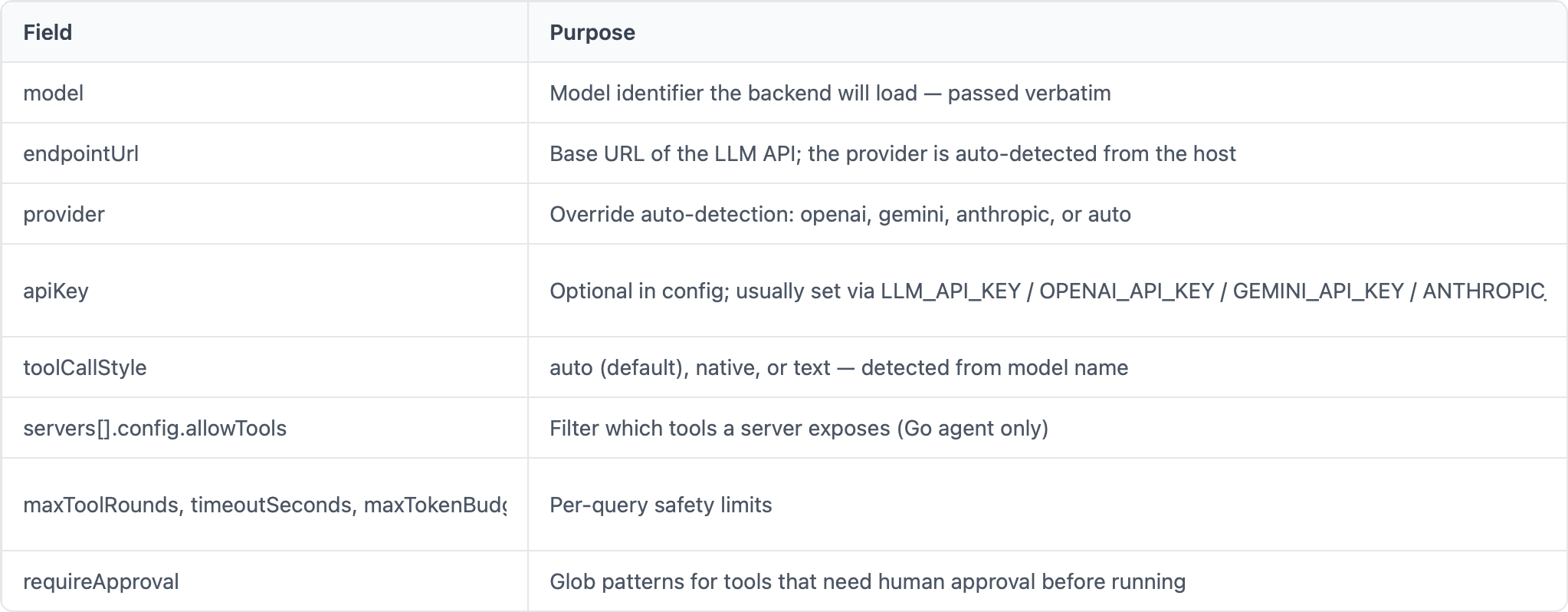
Environment variables in JSON strings are expanded at load time (${HOME}, etc.).
4. LLM Provider Endpoints (quick reference)
For the narrative walkthrough with trade-offs and per-backend caveats, see Part 6: Running It Yourself. The recipes:
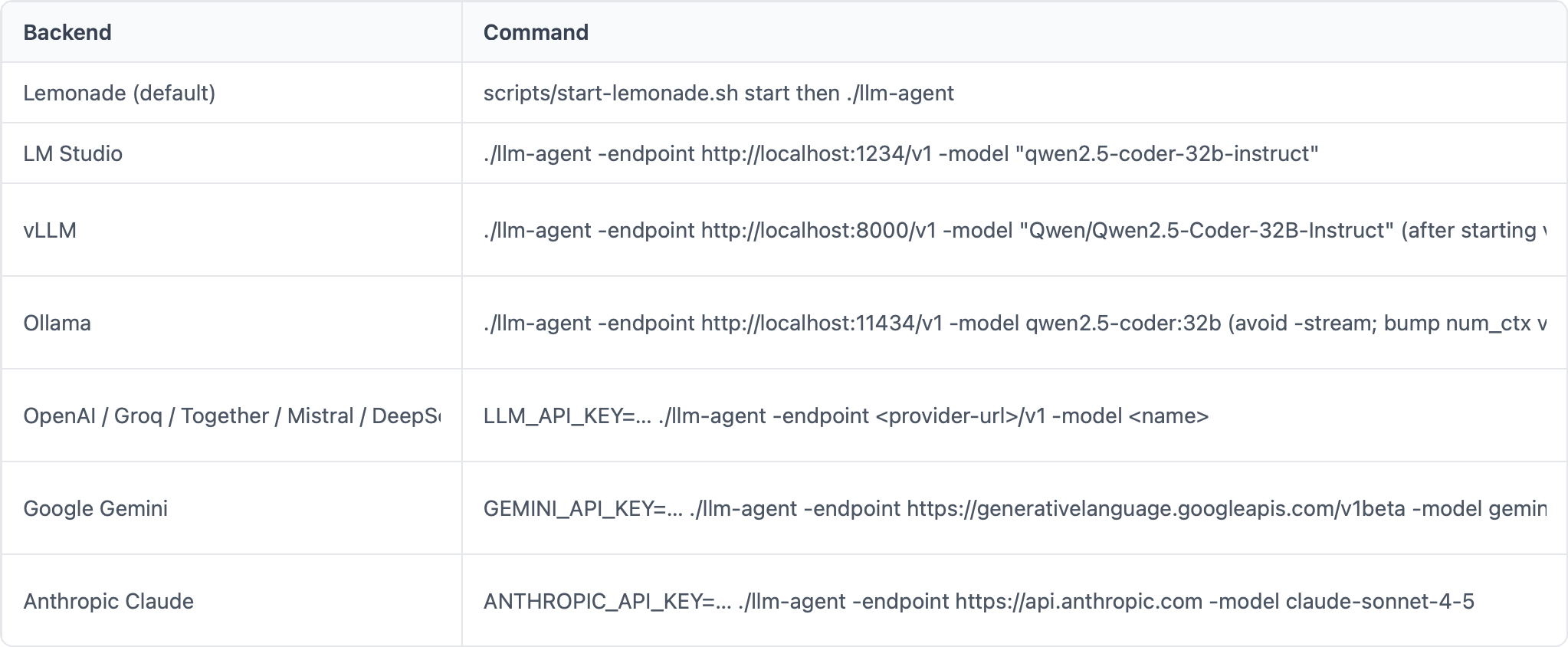
Provider is auto-detected from the URL (googleapis.com/gemini → Gemini, anthropic.com → Anthropic, else OpenAI-compatible). Override with -provider.
For a feature-by-feature comparison (streaming format, model management APIs, context detection), see tool-migration.md.
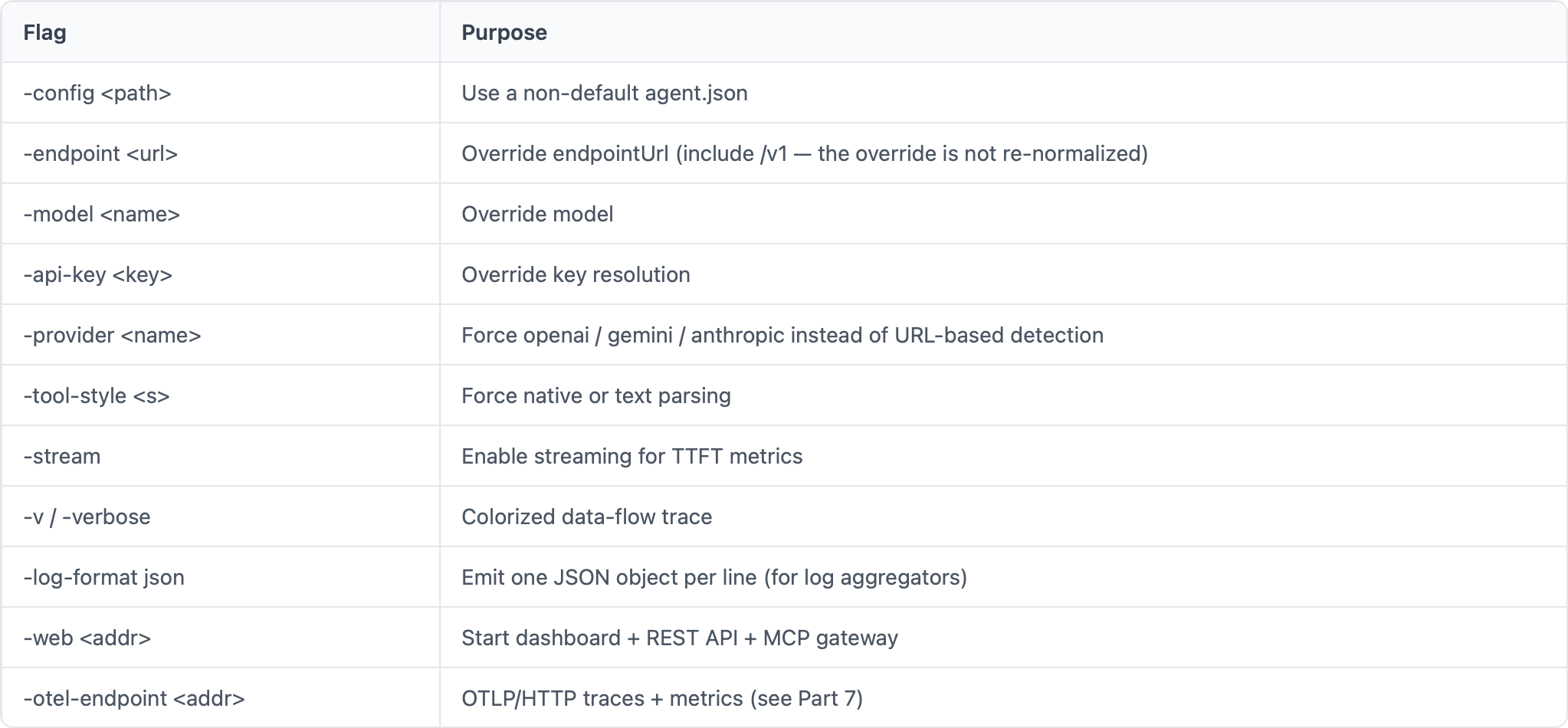
Common CLI flags
5. Observability (quick reference)
For the narrative walkthrough, span/instrument tables, PromQL examples, and investigation walkthroughs, see Part 7: Observability. The four layers compose freely:
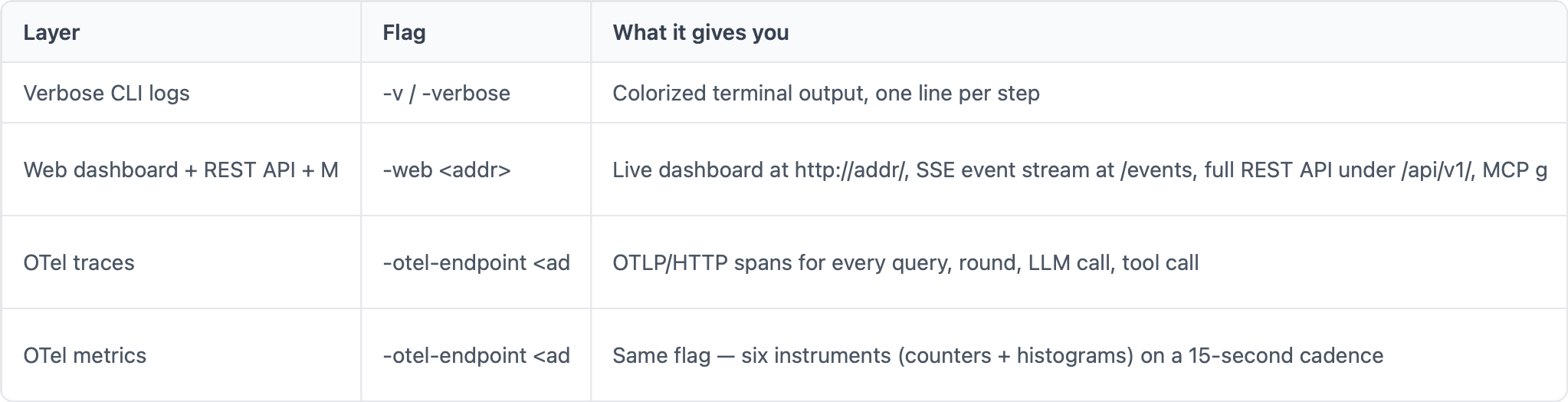
Full-observability one-liner:
bash
./llm-agent -v -web localhost:3131 -otel-endpoint localhost:4318 "your question"Web routes (when -web is on)
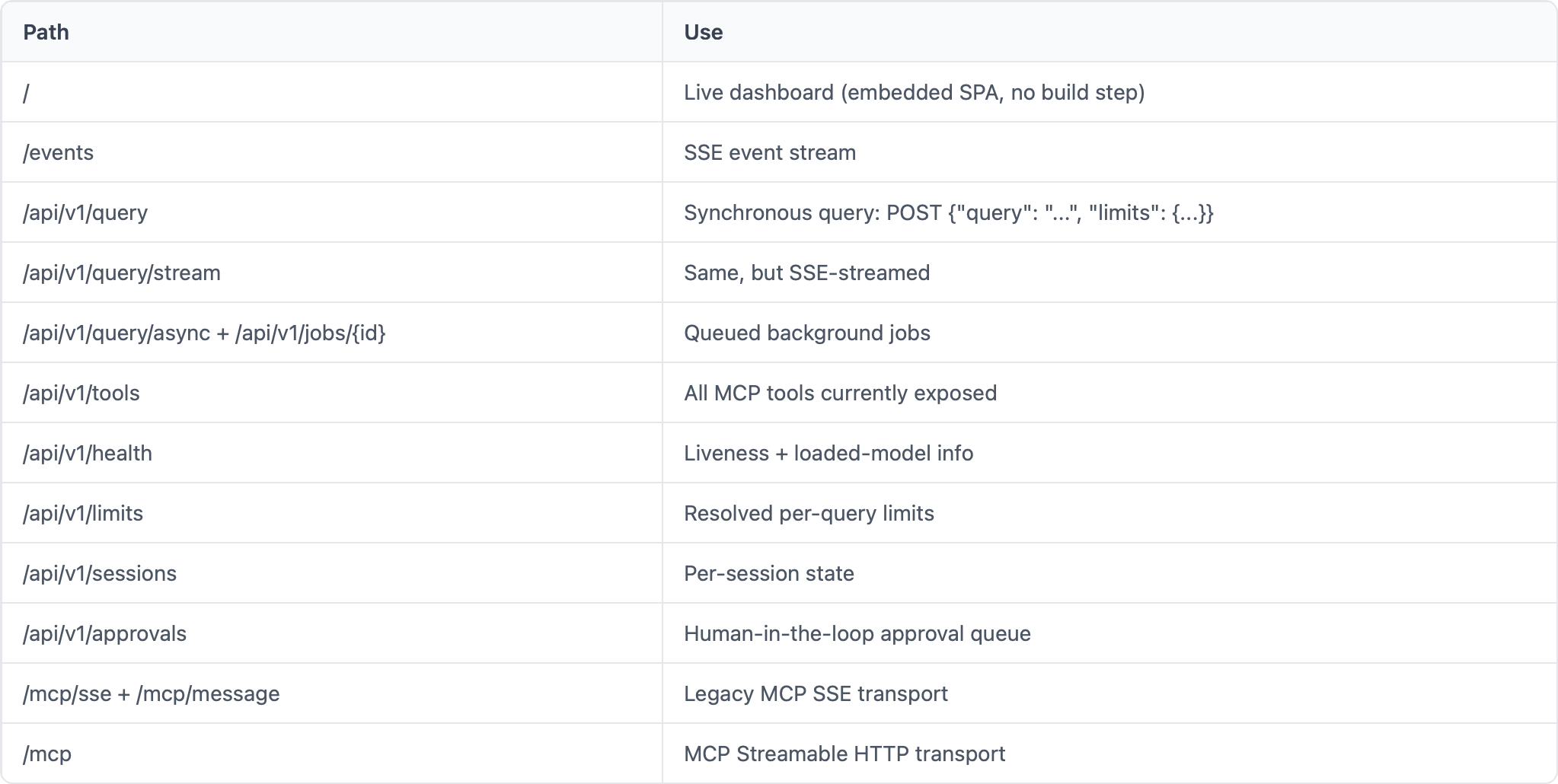
OTel metric instruments
Six instruments record the three hot paths. Two transports expose them:
OTLP push when
-otel-endpointis set (15-second cadence)Prometheus pull at
/api/v1/metricswhen-webis set — scrape with any Prometheus-compatible tool or plaincurl
Both readers can coexist.
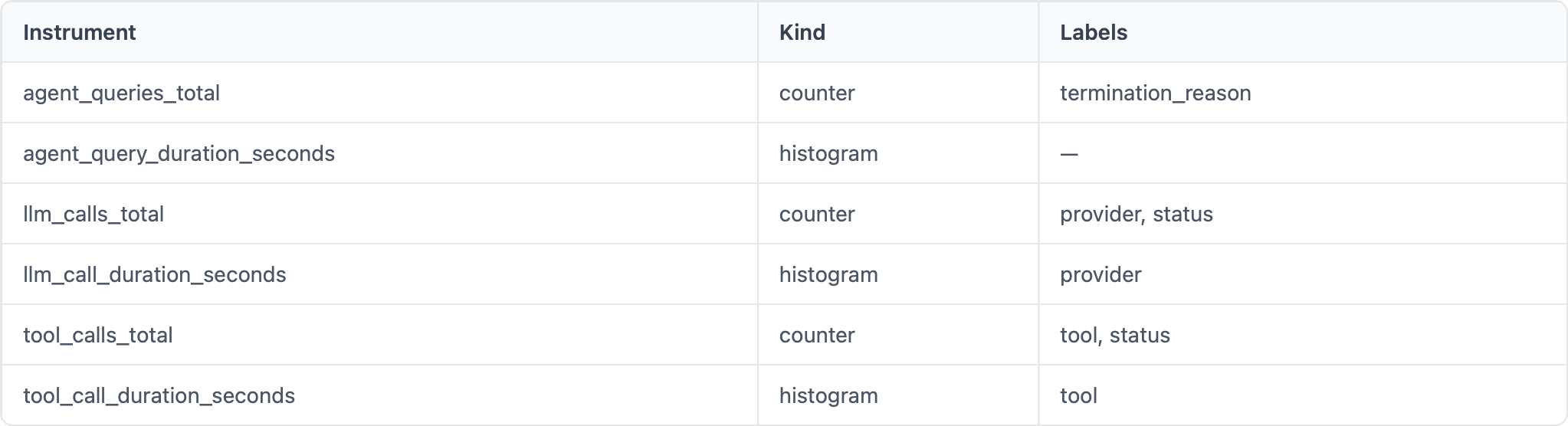
When neither -otel-endpoint nor -web is set, the recorders exit early — zero cost in the unconfigured case.
scripts/agent-cli.sh — curl wrapper for the HTTP surface
A bash CLI that wraps the REST API and metrics endpoints so you don’t have to memorize paths:
bash
scripts/agent-cli.sh health          # liveness + loaded model
scripts/agent-cli.sh tools           # list MCP tools
scripts/agent-cli.sh limits          # resolved per-query safety limits
scripts/agent-cli.sh sessions        # active sessions
scripts/agent-cli.sh query "is port 13305 in use?"   # synchronous query
scripts/agent-cli.sh stream "..."    # live SSE events for one query
scripts/agent-cli.sh events tool_call    # tail /events, filter to one type
scripts/agent-cli.sh metrics         # raw Prometheus exposition
scripts/agent-cli.sh metrics-summary # parsed human-readable counters + histogram sums
scripts/agent-cli.sh help            # full reference
Default target is
http://localhost:3131
; override with AGENT_URL=…. Requires jq for pretty-printing.
6. Four useful examples
All run against the default agent.json (Playwright + filesystem + fetch + ports). Run from go-agent/.
6.1 Web research (browser)
Search the web for “Claude Sonnet 4.5 release notes” and summarize the three biggest changes in plain English.
bash
./llm-agent -v "Search the web for 'Claude Sonnet 4.5 release notes' and summarize the three biggest changes in plain English."Exercises browser_navigate → browser_snapshot → reasoning. Good for “is the agent loop terminating cleanly after a multi-step browse?”.
6.2 URL fetch and extraction
Fetch https://modelcontextprotocol.io and tell me, in two sentences, what MCP is and what problem it solves.
bash
./llm-agent -v "Fetch https://modelcontextprotocol.io and tell me, in two sentences, what MCP is and what problem it solves."Single fetch call, no browser. Cheapest way to verify the tool layer works end-to-end without spinning Playwright up.
6.3 Local file analysis (filesystem)
Read
go-agent/PROMPT.mdand list the behaviors the system prompt enforces, one per line.
bash
./llm-agent -v "Read go-agent/PROMPT.md and list the behaviors the system prompt enforces, one per line."Stays inside the filesystem server’s scoped roots (. and ~/Documents). Useful smoke test for the filesystem MCP.
6.4 Multi-tool reasoning
List the
.gofiles ingo-agent/sorted by size (largest first) and explain in one sentence what the top three do.
bash
./llm-agent -v "List the .go files in go-agent/ sorted by size (largest first) and explain in one sentence what the top three do."Forces the model to chain filesystem listing → multiple file reads → synthesis in a single loop. Best stress test for the round/budget limits: if you see “max rounds reached”, lower the file count or raise -max-rounds.
7. Testing
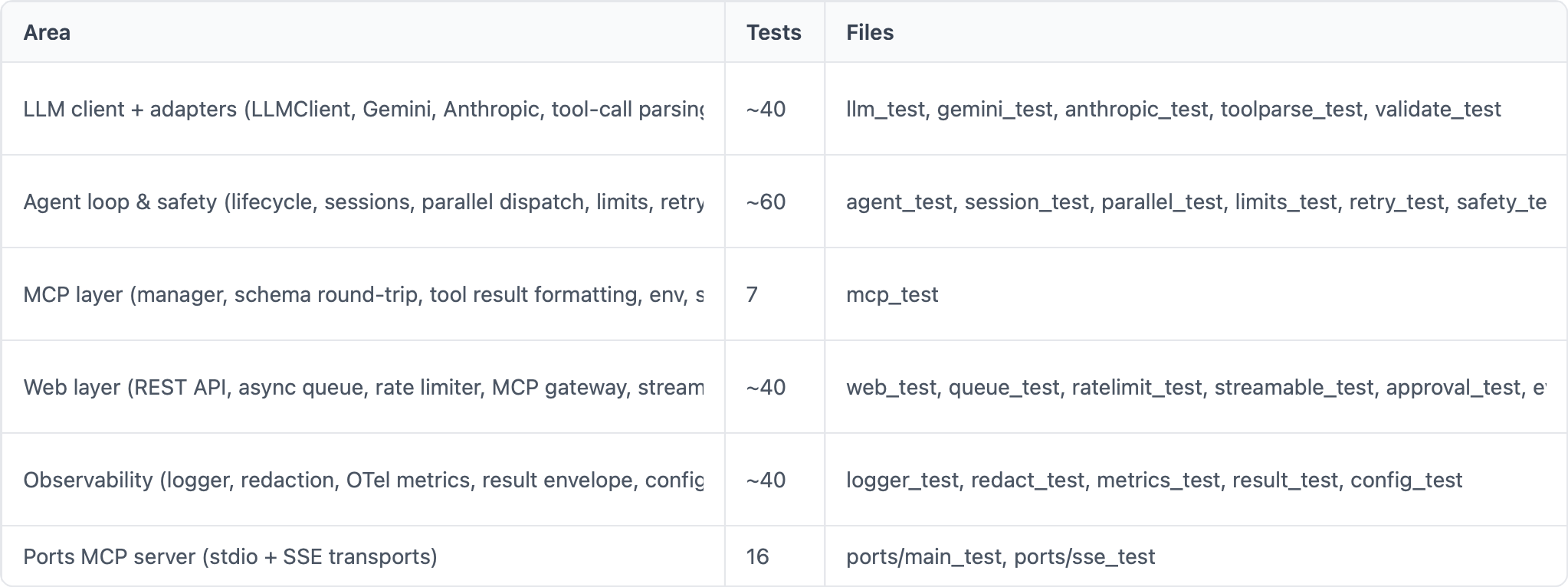
The agent ships with a comprehensive Go test suite — 26 test files, ~190 tests across both modules — and a small set of management-script smoke tests. None of them touch a real LLM or network, so the full suite runs in a few seconds.
Run everything
bash
cd go-agent
make test
That executes:
bash
go test ./... -count=1 -timeout 30s                    # agent: 24 test files
cd ../mcp-servers/ports && go test ./... -count=1 -timeout 30s   # ports MCP: 2 test files
Run a single file or test
bash
go test ./... -run TestSummarizeMessages -v            # one test by name
go test ./... -run TestHistorySize/empty -v            # one sub-test
go test -v -count=1 ./...                              # verbose, no cache
What’s covered
The full per-file table lives in go-agent/README.md § Test Suite. At a glance:
Known gaps
These code paths still lack dedicated tests:
mcp.go::StartServersandMCPManager.CallTool— require a live MCP subprocess; covered manually viamake mcp-testllm.go::ChatCompletion/chatStream/chatSync— the actual OpenAI streaming path is exercised only at runtime (the Gemini and Anthropic adapter tests use mock servers)llmstxt.go— llms.txt detection/cachingotel.go::initTracer— tracer initialization
The split web_*.go handlers (web_query, web_admin, web_mcp) are touched by web_test.go but not exhaustively.
The split web_*.go handlers (web_query, web_admin, web_mcp) are touched by web_test.go but not exhaustively. Contributions welcome.
Smoke tests
Once the Lemonade Server is running, you can also exercise the live HTTP surface:
bash
scripts/start-lemonade.sh test                         # ~6 health/chat probes against the server
make mcp-test                                          # ad-hoc REST + MCP gateway curl commands (prints instructions)
Neither of these is part of the Go test suite — they need a running backend.
8. Where to go next
Blog series (long-form tutorial):
Part 1: Introduction & Motivation
Part 2: Understanding MCP
Part 3: The Agent Loop
Part 4: Inside the Codebase
Part 5: Operations & Extending
Part 6: Running It Yourself — narrative version of § 4 above with full per-backend recipes and trade-offs
Part 7: Observability — narrative version of § 5 above with span/instrument tables, PromQL examples, and investigation walkthroughs
Reference docs:
go-agent/README.md— configuration reference + full test-suite tabletool-migration.md — feature-by-feature backend comparison
CHEATSHEET.md — quick API reference
SmartTechLabs
Well, if you want to dig deeper, need more insights as part of a workshop or want to elevate the Apache code covered in this series into a production ready grade, then lets get in touch via email: ai-consulting@smarttechlabs.de.
Copyright (C) 2026 By Smarttechlabs.de - All Rights Reserved
This article is part of a seven-part SmartTechLabs blog series on building a practical LLM agent system in Go. The goal is not to hide the complexity behind another black-box framework, but to make the moving parts understandable: agent loops, tool execution, MCP servers, local and remote LLM endpoints, OpenAI-compatible APIs, observability, and operational concerns. The example system supports local runtimes such as LM Studio, Ollama, Lemonade, vLLM, and llama.cpp, as well as cloud providers like Gemini and Anthropic. It is designed to run across AMD, NVIDIA, and Apple Silicon environments, from developer workstations to potentially lightweight edge deployments.
At SmartTechLabs, we help companies understand what LLMs and agent systems can realistically do, how they can be integrated into existing software and infrastructure, and where the operational, architectural, and governance boundaries are. Our consulting work covers GenAI workshops, technical enablement, architecture reviews, prototyping, integration with enterprise systems, and hands-on implementation support. This blog series is based on material from our GenAI workshops and is intended for teams that want to move beyond demos and start building reliable, observable, and maintainable AI-enabled systems.